What if the safest port on the internet was the one that isn’t on it?
In this hands-on tutorial, we’ll deploy a tiny Node.js app whose “hello world” is public, while its two other ports answer only through a private WireGuard VPN, a Clever Cloud Network Group. Along the way, we’ll hit (and understand) the one gotcha that trips everyone up. By the end, you’ll have your own encrypted private network in the cloud, laptop included, and it takes a handful of commands.
TL;DR: A Network Group is a private, encrypted WireGuard mesh that lets Clever Cloud apps, add-ons and external machines (your laptop, your phone, a third-party server) reach each other on any port.
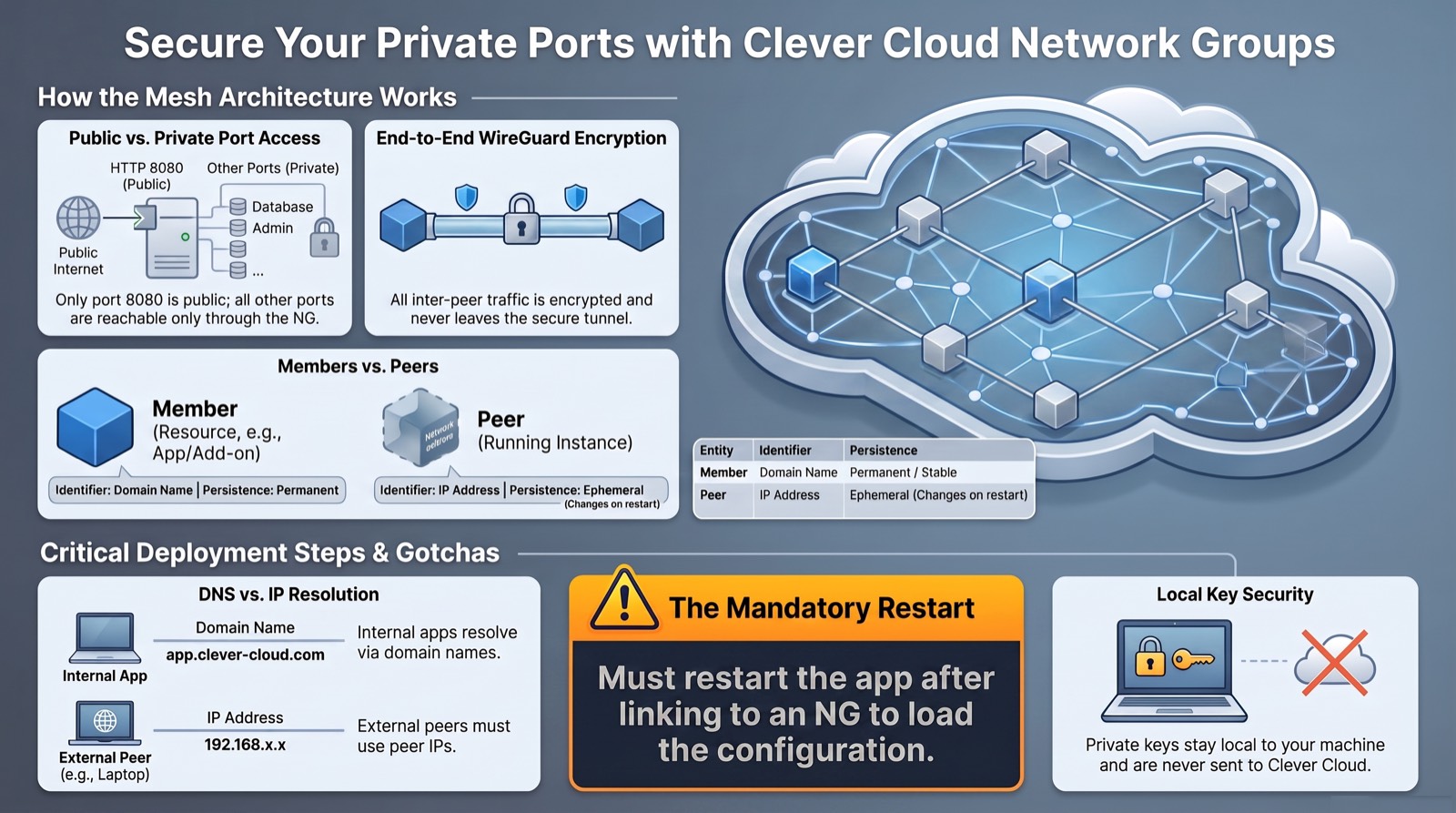
A Clever Cloud app only exposes one port publicly (HTTP, 8080); every other port it listens on is reachable only through the Network Group.
What this unlocks 🚀
Once any port can get a private, encrypted lane, a whole class of architecture headaches simply disappears:
- A database with zero public exposure. Your PostgreSQL add-on talks to your apps inside the mesh; the public internet doesn’t even know it exists.
- Clusters that gossip in private. Multi-instance apps (a Keycloak cluster, for example) sync with each other on any port they like.
- Admin access without a bastion. Your laptop joins the mesh and reaches dashboards, debug endpoints or metrics that were never exposed. No SSH tunnel, no jump host.
- Hybrid setups. That legacy on-prem server can finally talk to your cloud apps through an encrypted tunnel.
- Isolated test environments. Spin up private playgrounds nobody can stumble upon.
And the best part: Network Groups are included with Clever Cloud at no extra cost. Let’s see it in action.
What is a Network Group?
A Network Group (NG) is a virtual private network built on WireGuard that connects resources together over an encrypted mesh. Resources can be:
- Applications running on Clever Cloud,
- Add-ons (databases, caches, services…),
- External resources, anything outside Clever Cloud: your laptop, a phone, an on-prem server.
Inside the group, every participant can talk to every other participant on any port, as if they were on the same LAN. The traffic is encrypted end-to-end by WireGuard and never leaves the tunnel.
Members vs. Peers
Two words are used precisely, and the distinction matters:
| Term | Definition |
|---|---|
| Member | A resource linked to the NG (an app, an add-on, or an external resource). Each member gets a dedicated domain name inside the private network. |
| Peer | An instance of a member, with its own IP address inside the NG. |
The key consequence: one member can have several peers.
If an application scales to three instances, that single member has three peers, each with its own IP from the group’s CIDR range (e.g. 10.101.0.0/16, allocated when the NG is created).
The single-public-port model
A Clever Cloud application exposes exactly one port publicly, over HTTP.
The reverse proxy routes https://<app>.cleverapps.io to the port your app binds via the PORT environment variable, 8080 by default.
Any other port your process listens on is not reachable from the public internet. That’s precisely where Network Groups shine: those extra ports become reachable only to members and peers of the NG.
                       Public internet
                              │  (only 8080, via HTTPS)
                              ▼
        ┌─────────────────────────────────────────┐
        │  App instance (peer 10.101.0.7)          │
        │   :8080  ── public ──────────────────────┼──►  reverse proxy → *.cleverapps.io
        │   :9457  ── NG only ──┐                   │
        │   :4598  ── NG only ──┤                   │
        └───────────────────────┼───────────────────┘
                                 │  WireGuard mesh (encrypted)
                    ┌────────────┼─────────────┐
                    ▼            ▼             ▼
               your laptop   your phone   another app/add-on
               (10.101.0.6)  (10.101.0.8)  (peer …)
What we’ll build
A single Node.js process that opens three HTTP servers:
| Port | Reachable from | Response |
|---|---|---|
8080 | the public internet | hello world |
9457 | VPN only | you are on a VPN |
4598 | VPN only | you are still on a VPN, buddy! |
The joke writes itself: if you can read “you are on a VPN”, it’s because you are on the VPN.
All the code is ready to use in the companion repo: fredericalix/cc-ng-tutorial.
Prerequisites
- A Clever Cloud account.
- Clever Tools ≥ 3.12, logged in with
clever login. - WireGuard tools locally (
wg,wg-quick),brew install wireguard-toolson macOS. - Node.js ≥ 20 (only to test locally).
- Your Clever Cloud organisation ID (
orga_…).
List your organisations, then export the one you want to deploy to; every command below uses it:
# List your organisations (id + name)
clever curl https://api.clever-cloud.com/v2/summary \
  | jq -r '.organisations[] | "\(.id)  \(.name)"'

# Export the one you want to deploy to
export ORG="orga_xxxxxxxx-xxxx-xxxx-xxxx-xxxxxxxxxxxx"
Step 1: Get the app
Clone the tutorial repo:
git clone https://github.com/fredericalix/cc-ng-tutorial.git
cd cc-ng-tutorial
The heart of it is server.js, three servers, one per port, each returning a fixed string.
It binds on 0.0.0.0 so the process accepts traffic on both the public port and the WireGuard interface:
'use strict';

const http = require('http');

const LISTENERS = [
  { port: Number(process.env.PORT) || 8080, body: 'hello world' },
  { port: 9457, body: 'you are on a VPN' },
  { port: 4598, body: 'you are still on a VPN, buddy!' },
];

for (const { port, body } of LISTENERS) {
  const server = http.createServer((req, res) => {
    res.writeHead(200, { 'Content-Type': 'text/plain; charset=utf-8' });
    res.end(body);
  });
  server.listen(port, '0.0.0.0', () => {
    console.log(`Listening on 0.0.0.0:${port} -> "${body}"`);
  });
}
The public port reads
process.env.PORT(Clever sets it to8080); the other two are hard-coded because they only live on the private network. Clever Cloud starts the app withnpm start(seepackage.json).
The repo’s .gitignore already excludes WireGuard material (*.conf, wg-*.key), private keys never belong in git.
Test locally (use a spare PORT if 8080 is busy on your machine):
PORT=8085 node server.js &
curl localhost:8085   # hello world
curl localhost:9457   # you are on a VPN
curl localhost:4598   # you are still on a VPN, buddy!
Step 2: Deploy to Clever Cloud
From the cc-ng-tutorial folder:
# Create a Node.js app in your org (creates the git remote + links the folder)
clever create --type node "cc-ports" --org "$ORG"

# Deploy (git push under the hood)
clever deploy
At the end, Clever prints your URL: https://app-xxxxxxxx-….cleverapps.io/.
Step 3: Prove the public/private split
# Grab the app's public hostname with Clever Tools
APP_HOST=$(clever domain --format json | jq -r '.[0].hostname')

curl -s "https://$APP_HOST/"        # -> hello world     ✅ public

# The other two ports are NOT exposed by the reverse proxy:
curl -s --max-time 8 "http://$APP_HOST:9457/" \
  || echo "unreachable (expected)"  # -> unreachable     ✅
Only 8080 is routed publicly. 9457 and 4598 are listening on the instance but the public reverse proxy doesn’t forward them.
Good, that’s the whole point.
Step 4: Create the Network Group and link the app
# Grab the app id from .clever.json (written by clever create in this folder)
APP=$(jq -r '.apps[0].app_id' .clever.json)
echo "$APP"   # must be an app_… id

# Create the Network Group
clever ng create cc-ports-vpn --org "$ORG"

# Check it exists: you'll see its CIDR (e.g. 10.101.0.0/16), no member yet
clever ng get cc-ports-vpn --org "$ORG"
The NG is up. Now link the app to it:
clever ng link "$APP" cc-ports-vpn --org "$ORG"

# Check again: the app now shows up as a member
clever ng get cc-ports-vpn --org "$ORG"
Step 5: ⚠️ Restart the app (the gotcha)
Here’s the part that isn’t obvious and costs people an afternoon:
Linking the app is not enough. An already-running instance does not join the mesh until it restarts, because the WireGuard config is loaded at boot.
clever restartHow do I know? Right after linking, the app’s peer showed 0 B received / no handshake.
After clever restart, a new peer with a new IP appeared, and that one handshakes and serves traffic.
(The official docs only mention restarting after an unlink; empirically, the same applies to link.)
Which leads to the second rule:
Every restart/redeploy/scale = a new peer with a new IP. The old peer is auto-removed. So never hard-code the NG IP, the stable handle is the member’s domain name.
Find the current instance’s NG IP and store it in a variable, always derive it, never hard-code it.
last picks the most recently allocated peer, since two may appear briefly right after a restart while the old instance is being cleaned up:
APP_IP=$(clever ng get cc-ports-vpn --org "$ORG" --format json \
  | jq -r '[.peers[] | select(.type=="CleverPeer") | .endpoint.ngTerm.host] | last')
echo "App NG IP: $APP_IP"   # e.g. 10.101.0.9
Step 6: Put your laptop on the VPN
External peers join with a standard WireGuard configuration. Your private key is generated locally and never sent to Clever Cloud, you only register the public key.
# 1. Generate a WireGuard keypair (kept private by umask)
umask 077
wg genkey | tee wg-priv.key | wg pubkey > wg-pub.key

# 2. Register your laptop as an external peer (using its PUBLIC key)
clever ng create external my-laptop cc-ports-vpn "$(cat wg-pub.key)" --org "$ORG"

# 3. Build the WireGuard config (fill the private-key placeholder)
sed "s|<%PrivateKey%>|$(cat wg-priv.key)|" \
  <(clever ng get-config my-laptop cc-ports-vpn --org "$ORG") > wg-ccports.conf
chmod 600 wg-ccports.conf
Bring the tunnel up (needs sudo):
sudo wg-quick up ./wg-ccports.confStep 7: The payoff 🎉
# $APP_IP was captured in Step 5 (re-run that command if this shell is new)

curl "http://$APP_IP:9457/"   # -> you are on a VPN                🎉
curl "http://$APP_IP:4598/"   # -> you are still on a VPN, buddy!  🎉

sudo wg show                   # confirm 'latest handshake' with the app peer
Two ports that returned nothing from the public internet now answer, because you’re on the VPN. Take a second to appreciate it: your laptop and a cloud instance are now on the same private LAN, and the rest of the internet can’t even tell those ports exist.
If a curl hangs, verify the route really goes through the tunnel:
route -n get $APP_IP | grep interface # should be utunX, not en0DNS note (this trips everyone up): every member has a stable name of the form
<member-id>.m.<ng-id>.cc-ng.cloud, but it only resolves inside the NG (apps and add-ons).Your laptop gets no resolver, the
get-configoutput has noDNS =line and the NG exposes no resolver IP, so the name returnsNXDOMAIN. That’s expected, not a bug.From an external peer, use the IP (
$APP_IP). If you really want the name, add an/etc/hostsentry pointing at the current peer IP, but since that IP changes on every restart, IP-based access is usually simpler.
You just built a zero-trust network 🛡️
Take a step back: without touching a firewall, a VLAN or a certificate authority, you’ve just applied the core principles of zero-trust networking:
- Nothing is trusted by default. The only thing exposed to the internet is the one port you chose to expose. Everything else isn’t firewalled, it’s invisible.
- Every peer has a cryptographic identity. Each device joins with its own WireGuard keypair, and private keys never leave the device.
- Everything is encrypted, everywhere. Traffic between peers travels through end-to-end WireGuard tunnels, even inside Clever Cloud’s own infrastructure.
- Trust is revocable in one command. Laptop stolen?
clever ng delete external, and that key opens nothing anymore.
Zero-trust architectures usually come with enterprise price tags and months of integration. Here, it’s the default behavior of a feature included for free.
Cleanup
sudo wg-quick down ./wg-ccports.conf              # drop the tunnel
clever ng delete external my-laptop cc-ports-vpn --org "$ORG"  # revoke a device
clever ng delete cc-ports-vpn --org "$ORG"         # remove the NG
clever delete                                      # remove the app
Revoking external peers when a device should no longer have access is the main trust boundary of the whole setup, one command, done.
Key takeaways
- A Clever Cloud app is public on one port only (
8080). Everything else is private by construction, perfect for VPN-only services. - Linking an app to a Network Group requires a restart to take effect; the WireGuard config is loaded at boot.
- Peers are per-instance and ephemeral, each boot gets a new IP; old peers are cleaned up automatically. Address members by DNS name, not IP.
- Member DNS names resolve only inside the NG, Clever-managed apps/add-ons can use them; external peers get no resolver and must address members by IP.
- WireGuard keeps you honest: private keys stay local, only public keys are registered, and
.conf/*.keynever belong in git.
Happy tunneling. If you can read “you are on a VPN”, you earned it. 🛡️